FLORA AI: tested through Claude — can AI write Czech?

FLORA has been on my "to try" list since spring. A node-based canvas for images, video, audio, and 3D, 50+ models in one place, and — this is what got me — an official MCP server, so you can drive it straight from Claude. So that's what I did. No clicking around the UI, just Claude, a connector, and one question: can it handle something regular generators still keep botching?
Spoiler: Czech, with all its háčeks and čárkas, is still a great test. And the results turned out far more interesting than I expected.
What FLORA is
FLORA (flora.ai) is an "AI canvas for designers, brand teams, and agencies". Instead of one prompt and one result, you lay out nodes on an infinite canvas — text, image, video, audio, 3D — and wire them together into a pipeline. The output of one node is the input of the next.
A few facts for context:
- Founder: Weber Wong, former investor at Menlo Ventures. Public launch in February 2025.
- Funding: $6.5M seed (June 2025), $42M Series A led by Redpoint (January 2026). Investors include Guillermo Rauch of Vercel.
- Customers: Pentagram, Alibaba, Brex, Lionsgate.
- This year's pace: Batch nodes and Techniques (March), the FAUNA agent right inside the canvas, Audio node (April), MCP + API + CLI (May 19), Timeline editor (July), the return of LoRA training for Flux 2 and Krea 2 (September 2).
Key concepts worth understanding:
- Techniques — saved multi-step workflows that run as a single node (background swap, relight, upscale, sketch-to-render).
- Custom Actions — you describe a deterministic tool in plain language ("halftone effect", "watermark") and FLORA builds a reusable node out of it.
- Elements — character, product, or style references (up to 8 images). FLORA itself admits it doesn't guarantee consistency.
- FAUNA — an agent in the side panel that can add nodes, pick models, and run up to 50 nodes at once. Messages with it are free.
How I connected it
The MCP server lives at https://agents.flora.ai/mcp and authorizes via OAuth — no API key. In Claude Code it's a one-liner:
claude mcp add --transport http flora https://agents.flora.ai/mcp
In Claude.ai / desktop it's Settings → Connectors → Add custom connector. FLORA also ships a skills package — flora-batch-generate, flora-refine-loop, flora-mockup-deck, flora-script-to-video, and more. That's the "judgment layer" on top of the raw tools: it knows when to generate in parallel, when to stop, and when to ask for approval because the next step costs money.
What pleased me right away: reads are free. Claude can pull the list of workspaces, projects, models, and prices without spending a cent. And there are a lot of models — the MCP returned 449 models, 187 of them video. Each with an estimated price in dollars and generation time.
First hiccup: creating a new project via MCP failed with 400 input_validation_error and the message "Server Error". Most likely a project limit on my plan, but the error message won't tell you that. I worked around it with an empty project I already had.
The test: 2 prompts × 4 models
I picked four models in a similar price bracket and sent them two prompts in a single batch — FLORA MCP can run up to 20 generations in parallel in one call:
- Czech poster — a retro travel poster with the exact text "Příliš žluťoučký kůň" and the subtitle "úpěl ďábelské ódy". Together that's the classic Czech pangram — "Příliš žluťoučký kůň úpěl ďábelské ódy", roughly "A too-yellow horse moaned devilish odes" — packed with every tricky diacritic the language has.
- Product photo — a black mechanical keyboard on a concrete desk, an espresso, one translucent turquoise key, morning light from the left.
All 8 images were done in about 45 seconds, and FLORA named and arranged them on the canvas by itself:
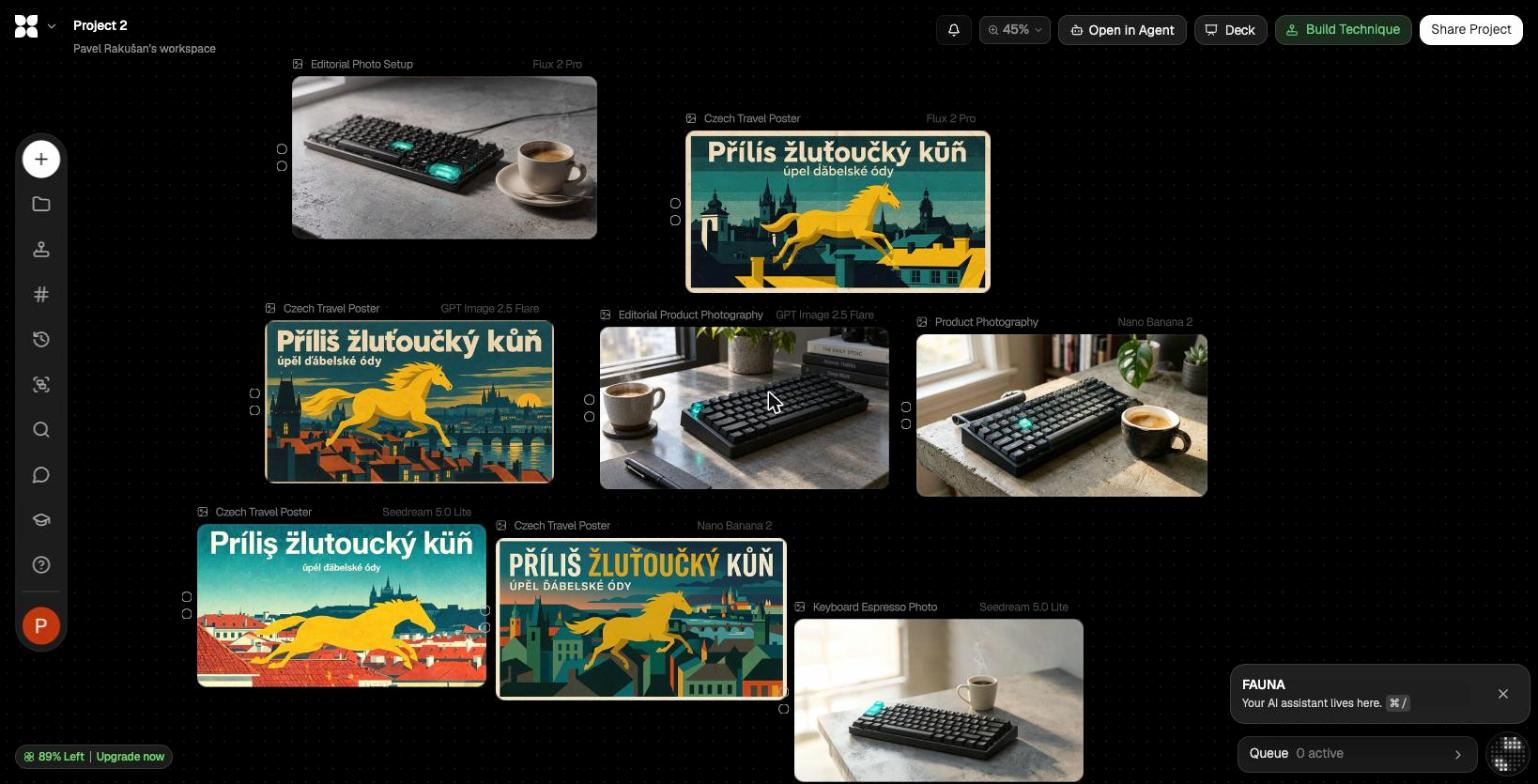
Round 1: can AI do Czech?
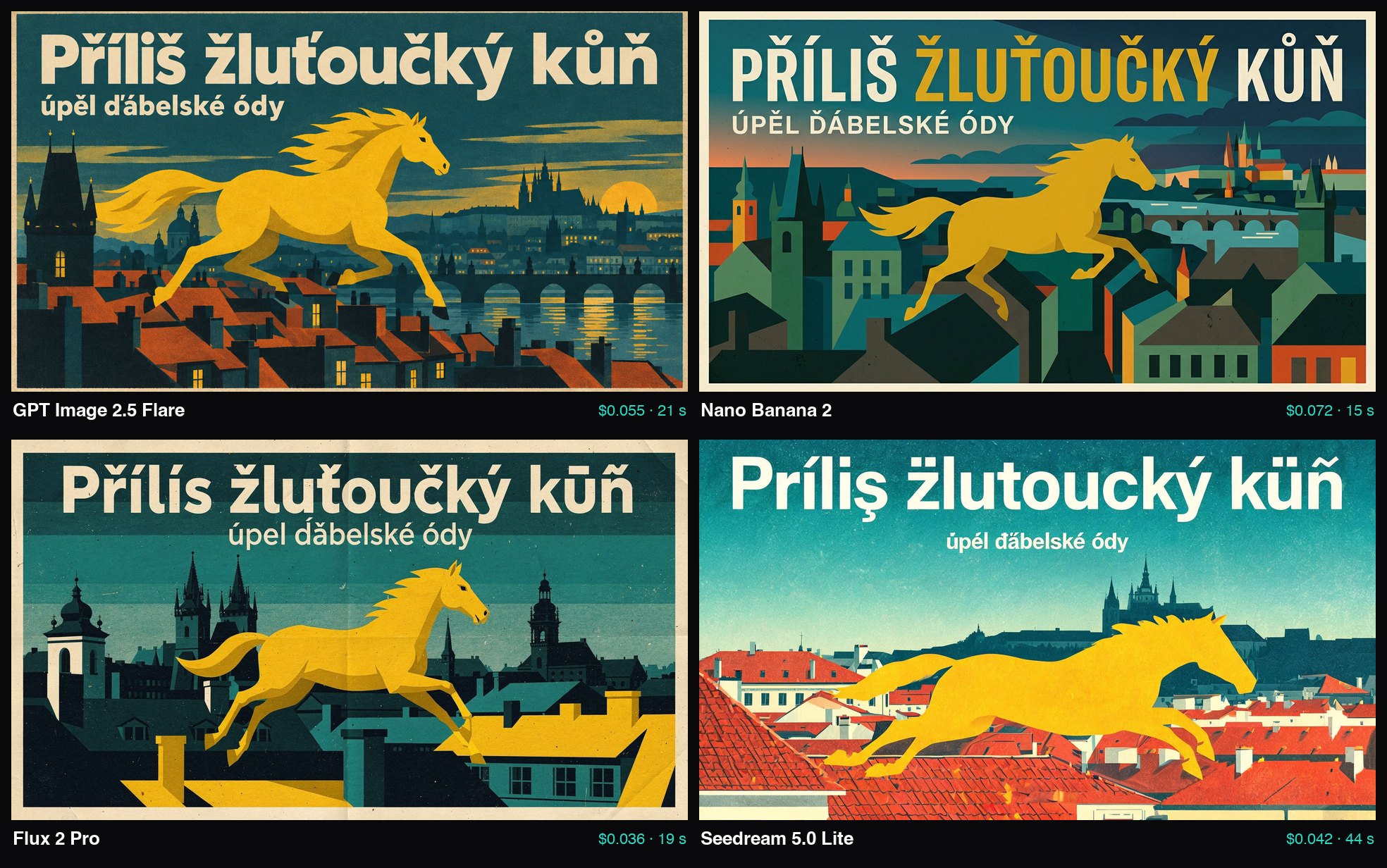
| Model | Headline | Subtitle | Verdict |
|---|---|---|---|
| GPT Image 2.5 Flare | Příliš žluťoučký kůň ✓ | úpěl ďábelské ódy ✓ | Flawless |
| Nano Banana 2 | PŘÍLIŠ ŽLUŤOUČKÝ KŮŇ ✓ | ÚPĚL ĎÁBELSKÉ ÓDY ✓ | Flawless (all caps) |
| Flux 2 Pro | Přílís žluťoučký kūñ | úpel ďăbelské ódy | 6 errors |
| Seedream 5.0 Lite | Príliș žlutoucký küñ | úpél ďăbelské ódy | Nearly every diacritic wrong |
This is exactly the kind of difference you'll never see in English benchmarks. GPT Image 2.5 and Nano Banana 2 get Czech perfectly right — including ť, ů, and ď, which models were still choking on last year. Nano Banana even decided on its own to highlight "ŽLUŤOUČKÝ" (yellow) in yellow, which is a clever typographic touch.
Flux 2 Pro looks the best artistically of the four (that paper grain, those rooftops), but it guesses at the diacritics: í instead of i, s instead of š, and the horse turned into "kūñ" with a Spanish tilde. Seedream mixes Romanian ș, German ü, and Romanian ă. You can tell it understands that "some accent goes here", just not which one.
Practical takeaway: if you're doing anything with Czech text in an image — banners, posters, social media — go with GPT Image 2.5 or Nano Banana 2. Use Flux and Seedream for the visuals and add the text afterwards in an editor.
Round 2: product photo
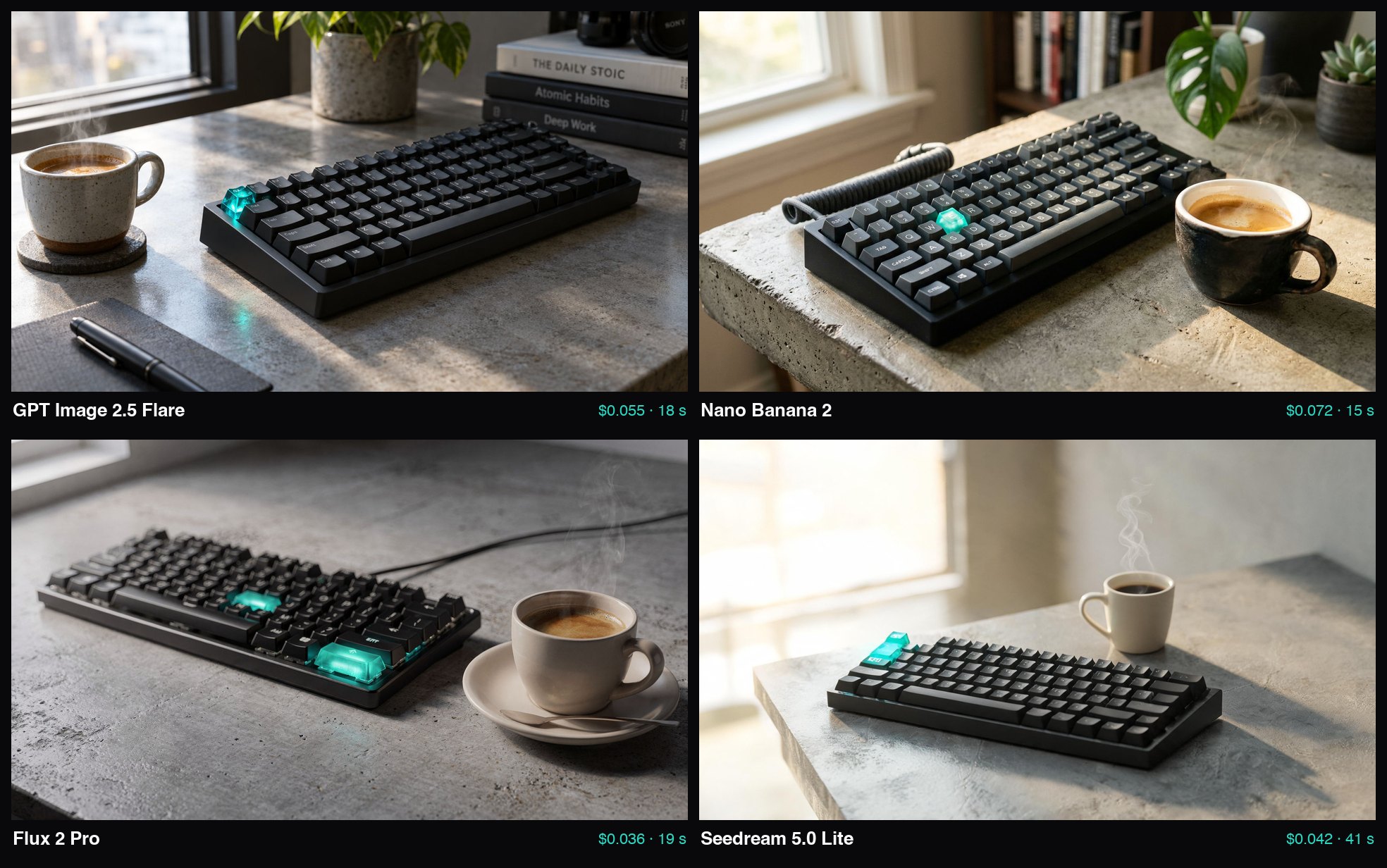
Here the ranking got shuffled:
- Nano Banana 2 (top right) — the most "magazine" shot. Coiled cable, a monstera, concrete texture, a single glowing key exactly as briefed. If I had to hand something to a client, this is the one.
- GPT Image 2.5 Flare (top left) — technically excellent, but it added props I never asked for: the books The Daily Stoic, Atomic Habits, and Deep Work with legible titles. Needlessly "lifestyle" for a product shot.
- Flux 2 Pro (bottom left) — beautiful light and steam rising from the coffee, but two keys are glowing instead of one. The classic counting problem.
- Seedream 5.0 Lite (bottom right) — the cleanest, catalog-style minimalism, brief fulfilled. But the keyboard is small in the frame and the whole thing feels more like stock.
What it cost
Since May, FLORA doesn't use credits — it charges dollars based on each model's API price. The MCP returns charged_cost for every generation:
| Model | Price per image | Time |
|---|---|---|
| Flux 2 Pro | $0.036 | ~19 s |
| Seedream 5.0 Lite | $0.042 | ~41–44 s |
| GPT Image 2.5 Flare | $0.055 | ~18–21 s |
| Nano Banana 2 | $0.072 | ~15 s |
The whole test = 8 images for $0.41. The most expensive model was also the fastest. Failed generations aren't charged.
Plans (September 2026): Free with ~$2.50 a month (text and images only, no video or API), Starter $18, Pro $50, Max $200 per seat per month — and the plan price always includes the same amount for generation. There's an extra launch bonus until September 30. Watch out for video: a single Veo 3.1 generation costs over $3.80, so that's where your budget melts fast.
What I like about FLORA
- One canvas instead of six subscriptions. GPT Image, Nano Banana, Flux, Seedream, Kling, Veo, Runway, ElevenLabs… and you only pay for what you generate.
- The MCP is done properly. Parallel batches, dollar prices before you generate, skills with sensible safeguards. This isn't "an API bolted onto the product", it's first-class.
- Transparent pricing. No credit conversions. You see $0.036 and you know what it means.
- Nodes and Techniques make sense the moment you're producing a series — 30 product variants, 10 banner formats, one style.
What bugs me
- Error messages — "Server Error" when creating a project told me nothing.
- The free plan is tiny. $2.50 a month is a taste, not enough to actually work.
- Video costs are hard to estimate and add up quickly.
- Learning curve. The node UI is powerful, but for someone who wants "one image" it's overkill. Nano Banana in Gemini is enough for that.
Who it's for
Yes: designers, agencies, e-shops, and marketing teams that generate series and want models, workflows, and brand references in one place. And developers who want to drive image generation from Claude or a script.
No: if you occasionally need one image for a blog post. For that, FLORA is a sledgehammer to crack a nut.
I'm keeping it. Mainly because of the MCP — being able to tell Claude "make me four variants of the article header, pick the one with the best Czech, and send me the link" is exactly the kind of workflow I write this blog for. You'll find a more detailed rating in the FLORA review.