Telegram bot as monitoring — alerts and commands for a live system
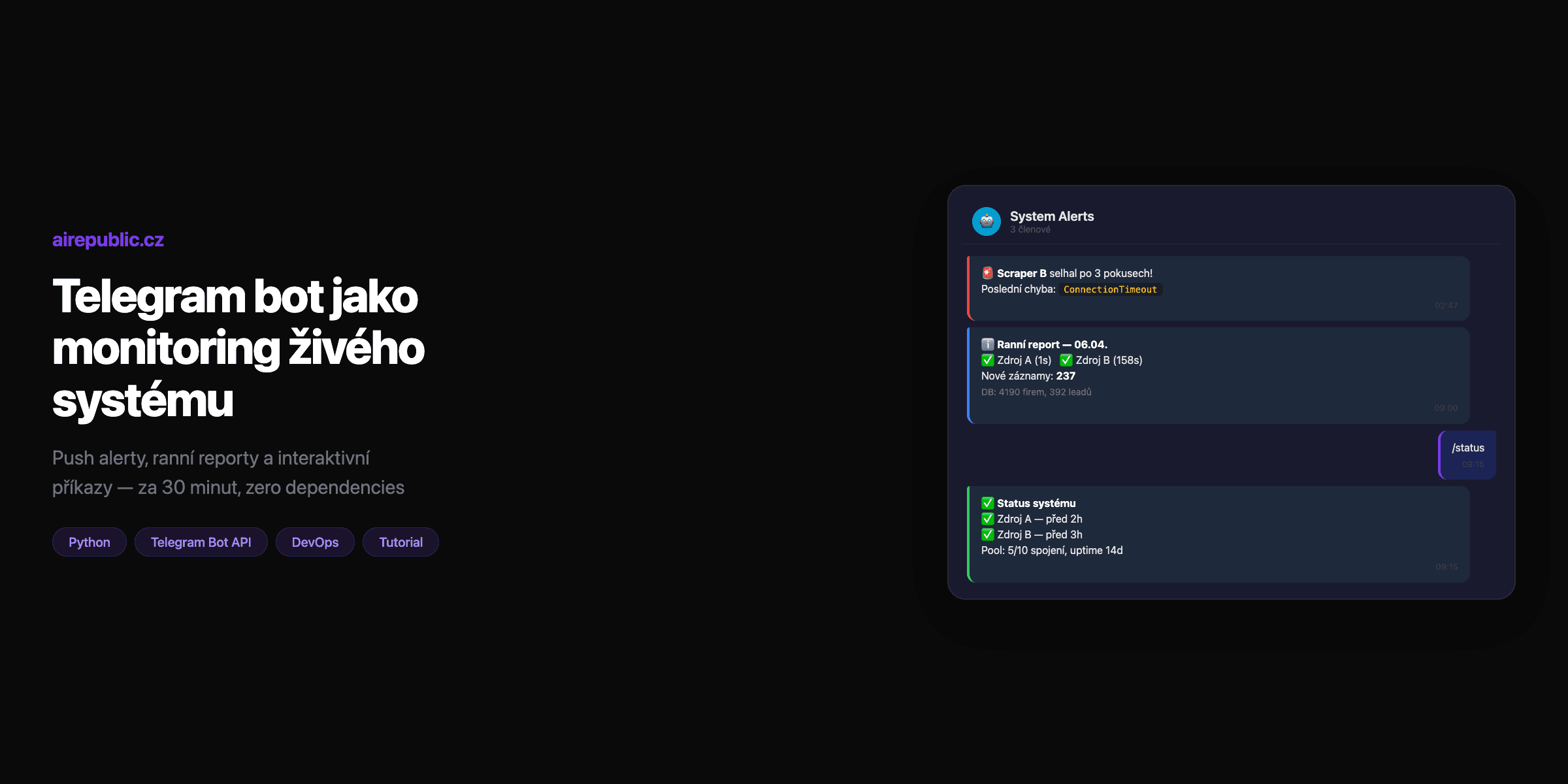
You've got a system running 24/7. Scrapers, schedulers, pipelines. Everything runs in Docker, everything is automated. Beautiful.
But then at night a scraper fails. The database briefly disconnects. A pipeline jams. And you find out in the morning when you open the dashboard and see red squares.
The fix? A Telegram bot that sends a push notification to your phone seconds after a problem. And as a bonus — you can send commands back through messages in the group.
30 minutes of work. Zero dependencies. Zero cost.
Why Telegram and not email/Slack?
Push notifications immediately. Email ends up in spam or you read it an hour later. A Telegram vibration on your phone will wake you up even at night (if you want).
Zero infrastructure. You don't need a webhook server, SMTP relay, or anything to host. One HTTP POST to the Telegram API is enough.
Group chat. Add the bot to a group → the whole team sees the same alerts. No forwarding, no "did you see that email?"
Free. The Telegram Bot API has no limits that would restrict you in normal operation. No pricing tier, no "free plan — max 100 messages."
Step 1: Create a bot via BotFather
Open Telegram and find @BotFather (verified account with a blue checkmark).
/newbot
BotFather will ask for a name and username. The name can be anything ("My Monitoring Bot"), the username must end in bot and be unique (my_system_alert_bot).
You'll get a token — a long string like:
7123456789:AAF1xYz2AbC3dEf4GhI5jKl6MnO7pQrStUv
This is your API key. Don't commit it anywhere. Save it to .env.
Step 2: Add the bot to a group and get the Chat ID
- Create a Telegram group (or use an existing one)
- Add the bot as a group member
- Send any message to the group
- Open in your browser:
https://api.telegram.org/bot<YOUR_TOKEN>/getUpdates
In the JSON response you'll find chat.id — a negative number like -1001234567890. That's your group's ID.
{
  "result": [{
    "message": {
      "chat": {
        "id": -1001234567890,
        "title": "System Alerts",
        "type": "supergroup"
      }
    }
  }]
}
Tip: If result is empty, send another message to the group and refresh the URL.
Step 3: Python module — zero dependencies
This is the whole module. No pip install, no python-telegram-bot, no aiogram. Just the standard library:
# src/utils/telegram.py
from urllib.request import Request, urlopen
from urllib.error import URLError
import json
import os
import logging

logger = logging.getLogger(__name__)

BOT_TOKEN = os.environ.get("TELEGRAM_BOT_TOKEN", "")
CHAT_ID = os.environ.get("TELEGRAM_CHAT_ID", "")
API_URL = "https://api.telegram.org/bot{token}/{method}"


def send_alert(message: str, level: str = "info") -> bool:
    """Send a message to the Telegram group. Returns True on success."""
    if not BOT_TOKEN or not CHAT_ID:
        logger.warning("Telegram not configured, skipping alert")
        return False

    prefix = {
        "critical": "🚨",
        "warning": "⚠️",
        "success": "✅",
        "info": "ℹ️",
    }.get(level, "")

    full_message = f"{prefix} {message}" if prefix else message

    payload = json.dumps({
        "chat_id": CHAT_ID,
        "text": full_message,
        "parse_mode": "HTML",
    }).encode("utf-8")

    url = API_URL.format(token=BOT_TOKEN, method="sendMessage")
    req = Request(url, data=payload, headers={"Content-Type": "application/json"})

    try:
        with urlopen(req, timeout=10) as resp:
            return resp.status == 200
    except (URLError, TimeoutError) as e:
        logger.error(f"Telegram alert failed: {e}")
        return False
Why this way?
No library. python-telegram-bot has 15+ dependencies and handles polling, handlers, conversations — none of which we need for sending messages. urllib is in the standard library and is enough for a single POST request.
HTML parse_mode. Telegram supports <b>, <i>, <code>, <pre> tags. Alert formatting looks professional without Markdown escape hell.
Graceful degradation. When the Telegram API doesn't respond, the system keeps running. The alert is logged as a warning, but nothing crashes. Monitoring must never take down what it's monitoring.
Env vars. Token and Chat ID in the .env file, never in the code. In Docker they're passed via docker-compose.yml.
Step 4: Wiring into trigger points
Now you have send_alert() — what remains is calling it at the right places. Here are three key ones:
a) Failure after retries are exhausted
Your scheduler has retry logic with exponential backoff. When a task fails even on the last attempt:
# scheduler.py — after retries are exhausted
MAX_RETRIES = 3

for attempt in range(MAX_RETRIES):
    try:
        result = run_source(source)
        break
    except Exception as e:
        if attempt == MAX_RETRIES - 1:
            send_alert(
                f"<b>{source.name}</b> failed after {MAX_RETRIES} attempts!\n"
                f"Last error: <code>{str(e)[:200]}</code>",
                level="critical"
            )
        else:
            wait = 60 * (2 ** attempt)  # 60s → 120s → 240s
            time.sleep(wait)
b) Database unavailable
The connection pool detects it can't connect to PostgreSQL:
# db.py — connection pool
try:
    conn = pool.getconn()
except OperationalError as e:
    send_alert(
        f"<b>DB unavailable!</b>\n"
        f"Pool: {pool.closed}/{pool.maxconn} connections\n"
        f"<code>{str(e)[:200]}</code>",
        level="critical"
    )
c) Morning report — daily summary
The scheduler runs a report every day at 9:00. The report is generated from the database and looks like this:
ℹ️ Morning report — 06.04.2026

Scraping (yesterday):
  ✅ Source A (1s)
  ✅ Source B (158s)
  ❌ Source C — timeout after 300s

New records: 237
  Approved: 12 | Pending: 180 | Rejected: 45

DB: 4190 companies, 392 leads, 5012 contacts

⚠️ Stuck checkpoints: 1
The generator code:
# daily_report.py
from datetime import date, timedelta

def generate_daily_report(db) -> str:
    yesterday = date.today() - timedelta(days=1)

    # Scraper results
    runs = db.fetch_all(
        "SELECT source, status, duration_s, error "
        "FROM scheduler_runs WHERE date = %s",
        (yesterday,)
    )

    lines = [f"<b>Morning report — {date.today().strftime('%d.%m.%Y')}</b>\n"]
    lines.append("<b>Scraping (yesterday):</b>")

    for run in runs:
        if run["status"] == "ok":
            lines.append(f"  ✅ {run['source']} ({run['duration_s']}s)")
        else:
            lines.append(f"  ❌ {run['source']} — {run['error'][:50]}")

    # New record statistics
    stats = db.fetch_one(
        "SELECT count(*) as total, "
        "sum(case when status='approved' then 1 else 0 end) as approved, "
        "sum(case when status='pending' then 1 else 0 end) as pending, "
        "sum(case when status='rejected' then 1 else 0 end) as rejected "
        "FROM leads WHERE created_at::date = %s",
        (yesterday,)
    )

    lines.append(f"\n<b>New records:</b> {stats['total']}")
    lines.append(
        f"  Approved: {stats['approved']} | "
        f"Pending: {stats['pending']} | "
        f"Rejected: {stats['rejected']}"
    )

    return "\n".join(lines)


# In the scheduler:
report = generate_daily_report(db)
send_alert(report, level="info")
Step 5: Interactive commands — the bot listens back
So far the bot only sends. Now we'll teach it to listen. The principle is simple — long polling via the getUpdates endpoint:
# src/bot/command_handler.py
from urllib.request import Request, urlopen
import json
import os
import time
import logging

logger = logging.getLogger(__name__)

BOT_TOKEN = os.environ.get("TELEGRAM_BOT_TOKEN", "")
CHAT_ID = os.environ.get("TELEGRAM_CHAT_ID", "")
API_URL = "https://api.telegram.org/bot{token}/{method}"

ALLOWED_CHAT_IDS = {CHAT_ID}  # whitelist — only your group


def get_updates(offset: int = 0, timeout: int = 30) -> list:
    """Long polling — waits for new messages."""
    url = API_URL.format(token=BOT_TOKEN, method="getUpdates")
    params = json.dumps({
        "offset": offset,
        "timeout": timeout,
        "allowed_updates": ["message"],
    }).encode("utf-8")

    req = Request(url, data=params, headers={"Content-Type": "application/json"})
    with urlopen(req, timeout=timeout + 10) as resp:
        data = json.loads(resp.read())
        return data.get("result", [])


def send_reply(chat_id: str, text: str) -> None:
    """Sends a reply to the chat."""
    url = API_URL.format(token=BOT_TOKEN, method="sendMessage")
    payload = json.dumps({
        "chat_id": chat_id,
        "text": text,
        "parse_mode": "HTML",
    }).encode("utf-8")

    req = Request(url, data=payload, headers={"Content-Type": "application/json"})
    urlopen(req, timeout=10)
Commands
# Handlers for individual commands
def handle_status(db) -> str:
    """Current system state."""
    last_runs = db.fetch_all(
        "SELECT source, status, finished_at "
        "FROM scheduler_runs "
        "ORDER BY finished_at DESC LIMIT 5"
    )

    lines = ["<b>System status</b>\n"]
    for run in last_runs:
        icon = "✅" if run["status"] == "ok" else "❌"
        ago = humanize_time(run["finished_at"])
        lines.append(f"{icon} {run['source']} — {ago}")

    return "\n".join(lines)


def handle_health(db) -> str:
    """Database and system health."""
    db_size = db.fetch_one("SELECT pg_database_size(current_database()) as size")
    conn_count = db.fetch_one("SELECT count(*) as c FROM pg_stat_activity")

    return (
        f"<b>Health check</b>\n\n"
        f"DB size: {db_size['size'] // 1024 // 1024} MB\n"
        f"Active connections: {conn_count['c']}\n"
        f"Pool: OK\n"
        f"Scheduler uptime: {get_uptime()}"
    )


def handle_run(source_name: str, scheduler) -> str:
    """Manual task trigger."""
    available = scheduler.get_sources()

    if source_name not in available:
        return (
            f"Unknown source: <code>{source_name}</code>\n"
            f"Available: {', '.join(available)}"
        )

    scheduler.trigger(source_name)
    return f"⚡ Starting <b>{source_name}</b>..."
Polling loop
# src/bot/polling.py
import threading
COMMANDS = {
"/status": lambda db, _: handle_status(db),
"/health": lambda db, _: handle_health(db),
"/run": lambda db, args: handle_run(args, scheduler),
"/help": lambda *_: (
"<b>Available commands:</b>\n\n"
"/status — recent runs\n"
"/health — system health\n"
"/run <source> — trigger a task\n"
"/help — this list"
),
}
def polling_loop(db, scheduler):
"""Main polling loop — runs in its own thread."""
offset = 0
while True:
try:
updates = get_updates(offset=offset)
for update in updates:
offset = update["update_id"] + 1
msg = update.get("message", {})
chat_id = str(msg.get("chat", {}).get("id", ""))
text = msg.get("text", "").strip()
# Security: only whitelisted groups
if chat_id not in ALLOWED_CHAT_IDS:
logger.warning(f"Ignoring message from unknown chat: {chat_id}")
continue
# Command parsing
parts = text.split(maxsplit=1)
command = parts[0].lower() if parts else ""
args = parts[1] if len(parts) > 1 else ""
# Strip @username suffix (/status@my_bot → /status)
command = command.split("@")[0]
if command in COMMANDS:
reply = COMMANDS[command](db, args)
send_reply(chat_id, reply)
except Exception as e:
logger.error(f"Polling error: {e}")
time.sleep(5)
def start_bot(db, scheduler):
"""Start polling in a daemon thread."""
thread = threading.Thread(
target=polling_loop,
args=(db, scheduler),
daemon=True,
)
thread.start()
logger.info("Telegram bot polling started")
Security of interactive commands
This matters — a bot that accepts commands needs at least basic protection:
Whitelist Chat ID. The bot only responds to messages from your group. Anyone else is ignored.
Logging. Log every received command — who, when, what. Later when you wonder why a scraper started at 3 AM, you'll check the logs.
No destructive operations. /run triggers a task, but there's no /delete or /restart. A Telegram group is not the right place for destructive commands.
# Logging commands
logger.info(f"Command: {command} {args} from chat_id={chat_id}")
Docker integration
# docker-compose.yml
services:
  scheduler:
    build: ./scheduler
    env_file: .env
    environment:
      TELEGRAM_BOT_TOKEN: ${TELEGRAM_BOT_TOKEN}
      TELEGRAM_CHAT_ID: ${TELEGRAM_CHAT_ID}
    restart: unless-stopped
# .env
TELEGRAM_BOT_TOKEN=7123456789:AAF1xYz2AbC3dEf4GhI5jKl6MnO7pQrStUv
TELEGRAM_CHAT_ID=-1001234567890
Starting the polling loop in the scheduler:
# main.py
from bot.polling import start_bot

# Start bot polling as a daemon thread
start_bot(db, scheduler)

# Scheduler continues with normal operation
scheduler.run()
What we deliberately skipped
Rate limiting on alerts. During a cascading failure, 10 messages a minute can come in. That's fine for now — you see it's on fire, which is exactly what you want. Once you have 50 sources, you'll add deduplication.
Webhook instead of polling. Webhooks require a publicly accessible HTTPS endpoint. Polling is simpler, more reliable, and for our volumes (dozens of messages a day) more than sufficient.
Buttons and inline keyboards. Telegram supports inline buttons, reply keyboards and callback queries. For monitoring it's overkill — text commands are enough.
Result
| What | Value |
|---|---|
| Implementation time | ~30 minutes |
| New dependencies | 0 |
| Monthly cost | $0 |
| Alert latency | < 2 seconds |
The operator gets a push notification on their phone within seconds of a failure. The morning report gives an overview without opening the dashboard. And when you need to manually trigger a scraper, you type /run source in the group instead of SSHing to the server.
The Telegram Bot API is the simplest monitoring I've ever implemented. No setup, no registration, no pricing. One Python file, two env vars, and you've got push monitoring on your phone.